If you want the full Seedance 2.0 experience—all the reference inputs, the highest resolution, every generation mode—Dreamina is where you go. It's ByteDance's AI creative platform, and it bundles video generation alongside image tools (Seedream 5.0), background removal, inpainting, and direct CapCut export. The interface isn't the most intuitive at first, especially the token system, but once you figure out the workflow it's hard to beat for the price.
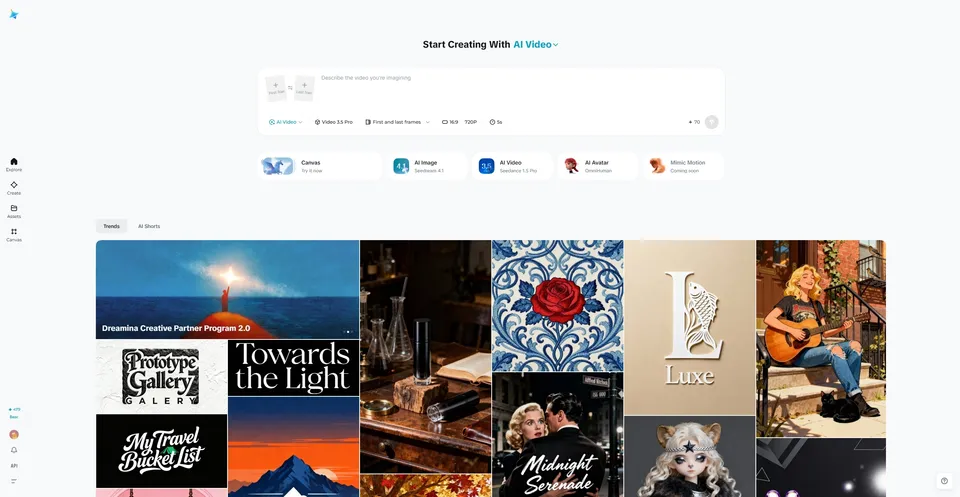
What Dreamina Includes
Dreamina isn't just a Seedance interface—it's a comprehensive AI creative suite with multiple tools.
| Tool | What It Does | Powered By |
|---|---|---|
| Video Generation | Text-to-video, image-to-video with multimodal references | Seedance 2.0 |
| Image Generation | Text-to-image, style transfer, design variations | Seedream 5.0 |
| AI Avatar / Lip Sync | Photo-to-talking-video with lip-synced speech | Seedance + TTS |
| Video Editing | AI-powered editing tools: upscale, extend, restyle | Multiple models |
| CapCut Integration | Send generated content directly to CapCut for professional editing | CapCut |
How to Access Dreamina
Web App
- Visit dreamina.capcut.com
- Sign in with Google, TikTok, or email account
- You'll land on the creative dashboard with access to all tools
- New users receive 225 free daily tokens
Desktop App
Dreamina is available as a desktop application through CapCut's ecosystem. The desktop version offers the same features as the web app with potentially better performance for large file uploads.
Mobile (Little Skylark / Xiao Yunque)
ByteDance's mobile app offers Seedance access with a more generous free tier (120 daily points + 3 free initial generations). Available on iOS and Android, primarily marketed in Asian markets but accessible globally.
Seedance 2.0 on Dreamina
This is the primary reason most users come to Dreamina. Here's how Seedance 2.0's modes map to the Dreamina interface:
| Dreamina Mode | Seedance Feature | What You Can Do |
|---|---|---|
| First Frame / Last Frame | Text-to-video + Image-to-video | Pure text prompts or define start/end frames |
| All-Round Reference | Multimodal @ system | Mix up to 12 files (images, videos, audio) with @ tags |
| Intelligent Multiframe | Multi-frame interpolation | Upload multiple frames, generate video filling the gaps (not yet Seedance 2.0) |
| Main Reference | Character consistency | Upload multiple angles of a character for better consistency (not yet Seedance 2.0) |
Note: As of February 2026, "Intelligent Multiframe" and "Main Reference" modes don't yet support Seedance 2.0—they work with earlier models. Expect 2.0 support in future updates.
Token and Credit System
Free Tier
- 225 daily tokens awarded automatically
- Tokens are shared across ALL Dreamina tools (images, video, avatars, editing)
- A single Seedance 2.0 generation consumes a significant portion of the daily allowance
- Best suited for occasional testing, not regular production
Paid Membership
- ~69 RMB/month (~$9.60 USD)
- Monthly credit allocation with larger allowances
- Unlocks "Fast Mode" generation (priority queue)
- Full access to All-Round Reference mode with multimodal inputs
- Commercial licensing for generated content
- 2K upscaling
- No watermark on outputs
- Annual subscription discounts available
Credit Top-Up
Additional credits can be purchased without a monthly subscription. Useful for occasional heavy use or when your monthly allocation runs out.
For a complete cost breakdown and comparison with competitors, see the Pricing Guide.
Other Dreamina Tools
Image Generation (Seedream 5.0)
Dreamina's image generator uses Seedream 5.0, ByteDance's latest image model. It's useful as part of the Seedance workflow—generate character designs or storyboard frames with Seedream, then use them as reference images in Seedance 2.0.
AI Avatar / Lip Sync
A dedicated tool for creating talking-head videos from a single photo. Simpler than using Seedance 2.0's full video generation for avatar content, but with more limited results (head-and-shoulders only, separate TTS audio). See the full AI Avatar Guide for details on both approaches.
Video Editing
AI-powered editing features including:
- HD Upscale — Boost video resolution
- Frame Interpolation — Smooth motion by adding in-between frames
- Video Extension — Extend clips beyond their original length
- Resync — Adjust lip-sync timing
CapCut Integration
Generated content can be sent directly to CapCut for professional video editing—adding titles, transitions, color grading, and assembling multiple clips into longer projects. This seamless pipeline from AI generation to final edit is one of Dreamina's key advantages.
Dreamina vs Other Platforms
| Platform | AI Video Model | Key Difference |
|---|---|---|
| Dreamina | Seedance 2.0 | Full multimodal references (12 files), native audio, integrated creative suite |
| ChatGPT (Sora) | Sora 2 | Text + 1 image only, better physics, limited quotas on Plus plan |
| Runway | Gen-4 | Subscription model, professional tooling, established in industry |
| Google AI Studio | Veo 3.1 | Best audio quality, expensive, limited access |
| Kling | Kling 3.0 | Lower price point, competitive quality, ByteDance competitor (Kuaishou) |
Tips for Getting Started
- Start with Little Skylark for free testing—it has a more generous free tier than Dreamina's web app
- Use "First Frame / Last Frame" mode for your first experiments—it's the simplest workflow
- Graduate to "All-Round Reference" once you're comfortable—this unlocks the full @ tag system
- Read the Prompt Guide first—prompt quality is the single biggest factor in output quality
- Set duration to match your intent—don't always max out at 15 seconds; shorter clips are faster and cheaper
- Select "unfixed camera" whenever your prompt includes camera movement directions
Known Issues and Limitations
- Token system is opaque: Exact token costs per generation aren't always clearly displayed before generating
- Queue times during peaks: Wait times of 1+ hour have been reported during high-demand periods
- Interface language: Some interface elements may default to Chinese; language settings are available but not comprehensive
- Regional pricing: Prices are set in RMB; USD equivalents fluctuate with exchange rates
- Platform stability: As a relatively new platform handling unprecedented demand, occasional errors and downtime occur
Good to Know
Is Dreamina free?
Dreamina offers 225 free daily tokens, but this is shared across all tools. For regular Seedance 2.0 use, a paid membership (~$9.60/month) is practically necessary. Little Skylark's mobile app offers a more generous free tier.
Is Dreamina the same as CapCut?
No. Dreamina is ByteDance's AI creative platform; CapCut is ByteDance's video editor. They're separate products that integrate with each other—you generate in Dreamina and edit in CapCut.
Do I need Dreamina to use Seedance?
Dreamina is the primary official platform, but Seedance is also available through Little Skylark (mobile), third-party platforms (Higgsfield, Imagine.Art), and will be available via API access in late February 2026.
Can I use Dreamina content commercially?
Commercial licensing is included with paid memberships. Free-tier generations may have usage restrictions. Check Dreamina's current terms for specifics.
Is my uploaded content safe on Dreamina?
Review ByteDance/CapCut's privacy policy before uploading sensitive or proprietary content. As with any cloud-based AI platform, uploaded files are processed on remote servers.
What's Jimeng AI?
Jimeng AI is the Chinese-market version of Dreamina. Same technology, different branding and pricing for the Chinese market.
Explore what you can create with Seedance 2.0 on Dreamina: Text-to-Video, Image-to-Video, or AI Avatars. For prompting best practices, start with the Prompt Guide.