We've wasted more credits on bad prompts than we'd like to admit. Seedance 2.0 understands complex instructions better than any previous model, but it still needs you to speak its language—and the gap between a vague prompt and a structured one is the difference between garbage and genuinely impressive output. Everything below comes from what actually worked for us across hundreds of generations in text-to-video, image-to-video, and multimodal reference workflows.
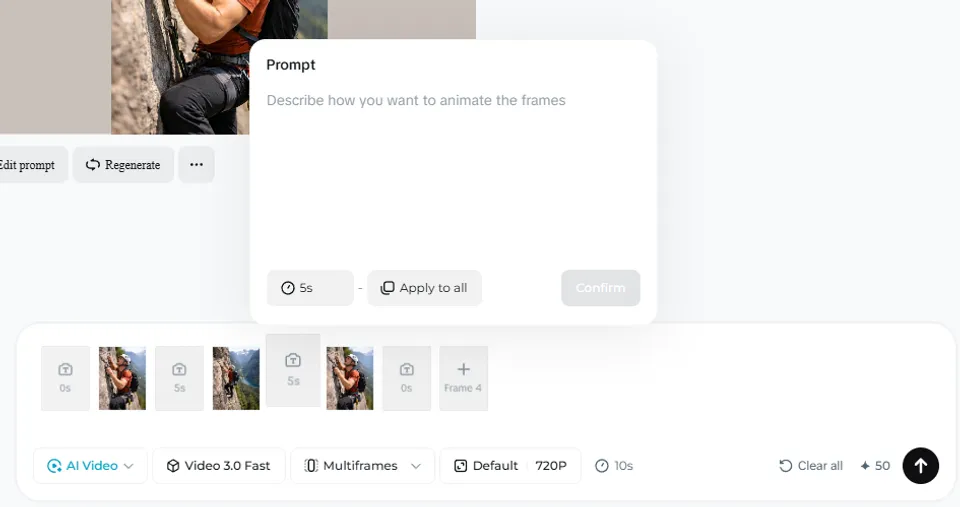
The 5-Part Prompt Framework
Every effective Seedance prompt follows the same structure. Think of it as a spine—you can add or remove vertebrae, but the order stays the same.
| Part | What It Does | Example |
|---|---|---|
| 1. Subject | Who or what appears on screen | A woman in a red leather jacket, mid-30s |
| 2. Action | What the subject does (present tense verbs) | steps into a neon-lit alley, pauses, looks over her shoulder |
| 3. Camera | Shot size + movement + angle + lens feel | Medium shot, slow dolly-in, eye level, normal lens |
| 4. Style | Visual anchor, lighting, color treatment | Cyberpunk neon, volumetric fog, teal-and-orange grade |
| 5. Constraints | What to exclude, timing, consistency notes | No text overlays, no crowd, maintain neon palette, 10s |
The golden rule: one verb per shot keeps things clean. Short prompts (under 60 words) consistently outperform long, poetic ones. Seedance 2.0 responds to precision, not volume.
The @ Reference System (Seedance 2.0)
This is where Seedance 2.0 separates itself from every other model. When you upload files—images, videos, or audio—the system assigns automatic tags: @Image1, @Video1, @Audio1. You reference these directly in your prompt to control exactly how each asset contributes to the final video.
How @ Tags Work
| Reference Type | Max Files | Prompt Syntax |
|---|---|---|
| Images | Up to 9 | @Image1 as the character, @Image2 as the background |
| Videos | Up to 3 | Imitate the action of @Video1 or Use the camera movement in @Video1 |
| Audio | Up to 3 | @Audio1 as background music, sync dancing to the beat |
Common @ Tag Patterns
- First/last frame:
@Image1 as first frame and @Image2 as last frame - Character + background:
@Image1 is the character. @Image2 is the environment. - Motion transfer:
Imitate the action of @Video1 with the character from @Image1 - Expression transfer: Upload a reference video of expressions → the model maps them onto your character
- Camera replication:
Use the camera movement in @Video1 exactly - Music sync:
@Audio1 as soundtrack. Characters dance to the beat. - Multi-character:
@Image1 is Character A. @Image2 is Character B. They are fighting in @Image3.
You can combine up to 12 references in a single generation. The more specific you are about each reference's role, the better the output.
Camera Vocabulary That Actually Works
Seedance 2.0 understands professional cinematography language. Using the right terms gives you director-level control over framing and movement.
Shot Sizes
| Term | What You Get | Best For |
|---|---|---|
| Wide / establishing | Full environment visible, subject small | Opening shots, landscapes, context |
| Medium | Waist-up framing | Dialogue, product demos, UGC |
| Medium close-up | Chest to head | Talking heads, emotional moments |
| Close-up | Face fills frame | Emotion, detail, product macro |
Camera Movements
| Verb | What It Does | Speed Modifier |
|---|---|---|
| Dolly in/out | Camera moves toward/away from subject | slow dolly-in, 1-2 feet |
| Track / trucking | Camera moves parallel to subject | medium tracking shot |
| Crane up/down | Vertical camera movement | slow crane up revealing cityscape |
| Pan left/right | Camera rotates horizontally (fixed position) | gentle pan right following subject |
| Handheld | Realistic shake, documentary feel | handheld with slight sway |
| Gimbal | Smooth stabilized movement | gimbal-smooth push forward |
| Orbit / surround | Camera circles around subject | slow orbit around the character |
Angles
- Eye level — Neutral, relatable (default if not specified)
- Low angle — Subject appears powerful, dominant
- High angle — Subject appears vulnerable, small
- Dutch angle — Tilted frame for tension (use sparingly)
- Aerial / bird's eye — Overhead perspective
Lens Feel
- Wide (24-28mm feel) — More environment, slight distortion
- Normal (35-50mm feel) — Natural perspective, most versatile
- Telephoto (85mm+ feel) — Compressed background, subject isolation
- Anamorphic — Cinematic widescreen with characteristic lens flares
Tip: Always select "unfixed camera" in Seedance settings when you want camera movement. If framing is wrong but the action is correct, adjust only the Camera line—don't rewrite the whole prompt.
Audio Keywords for Native Sound
Seedance 2.0 generates audio simultaneously with video—it's not a post-process effect. You can influence the audio output through specific keywords in your prompt.
| Keyword | Audio Effect | Example Usage |
|---|---|---|
| "reverb" | Echo/reverberation for large or underwater spaces | Voice echoes with reverb in the empty cathedral |
| "muffled" | Sound dampened by walls or barriers | Muffled music from behind the closed door |
| "high-pitched" | Sharp, piercing sounds | A high-pitched whistle cuts through the silence |
| "echoing" | Sound bouncing in large halls | Footsteps echoing through the marble hallway |
| "crunchy" | Textural ground sounds | Boots on crunchy gravel path |
| "metallic clink" | Metal-on-metal interactions | Swords clash with a metallic clink |
For dialogue, include the exact lines in your prompt. Seedance supports lip-sync in 8+ languages including English, Chinese, Japanese, Korean, Spanish, French, German, and Portuguese. The model can often detect the appropriate language from context—for instance, referencing a Chinese-looking character may default to Chinese speech unless you specify otherwise.
Lighting That Makes or Breaks 2K Output
Without proper lighting descriptions, Seedance's 2K resolution loses its impact. Always specify light quality in your prompts.
- Cinematic 3-point lighting — Professional studio look
- Soft key from 45° — Flattering face lighting for talking heads
- God rays — Dramatic beams of light through atmosphere
- Volumetric fog — Visible light beams in haze
- Golden hour — Warm, directional sunset/sunrise light
- Neon — Cyberpunk, night scenes, colorful urban
- Harsh overhead — Documentary, interrogation, drama
- Rim light / backlight — Silhouette separation, ethereal mood
- Flickering — Candlelight, unstable power, horror
Multi-Shot Storytelling
Seedance 2.0 can generate sequences with multiple scenes, different camera angles, and natural transitions—all in a single generation. The key phrase is "lens switch", which tells the model to cut to a new shot.
Multi-Shot Prompt Structure
Describe each scene sequentially. Include transitions and specify character consistency across shots:
Example: A princess wearing a glittery white dress running away from a massive dragon with glowing red eyes. The dragon breathes fire, which ignites the ground and foliage behind her. Lens switch. She reaches a river and quickly jumps onto drifting debris to cross. Lens switch. The princess then looks back to see the dragon roaring in frustration as it can't cross the river.
In testing, Seedance 2.0 follows multi-step narratives with high accuracy—maintaining character consistency, understanding cause-and-effect relationships, and generating appropriate audio for each scene transition.
Copy-Paste Templates
These templates cover the most common video types. Replace the bracketed sections with your specifics.
UGC / Influencer Video
| Part | Template |
|---|---|
| Subject | [person description, age range, setting] |
| Action | talks casually about [product/topic] while [natural gesture] |
| Camera | Medium, handheld phone perspective, slight sway, eye level, normal lens |
| Style | Natural indoor light, ungraded look, light motion blur |
| Constraints | No captions, no snap zooms, keep hands natural, 8-10s, simple background |
With references: Upload person photo as @Image1, product photo as @Image2. Prompt: @Image1 is the influencer talking about @Image2 product. UGC style, phone perspective.
Product Commercial
| Part | Template |
|---|---|
| Subject | [product name, material, color, key visual feature] |
| Action | rotates slowly / slides into frame / hero reveal with subtle movement |
| Camera | Close-up to medium close-up, slow dolly-in, locked horizon, normal-to-telephoto |
| Style | Soft key light + gentle rim, neutral color grade, light film grain |
| Constraints | No logos, no flares, hold final frame 2s, 6-8s total |
With references: Upload product photo. Prompt: Commercial for @Image1. Show real-life scenarios of people using it. Clean, professional look. Seedance can generate full ads with product placement, text overlays, and scene transitions from a single product image.
Cinematic / Film Scene
| Part | Template |
|---|---|
| Subject | [character or location, distinctive visual details] |
| Action | [specific beat: waits, turns, breathes, steps into light] |
| Camera | Wide establishing 2s then slow push to medium, gimbal-smooth, eye level |
| Style | [single visual anchor, e.g., "overcast natural light, muted blues, film grain"] |
| Constraints | No Dutch angles, no crowd, no neon, maintain overcast, 10-12s |
Talking Head / Presentation
| Part | Template |
|---|---|
| Subject | [speaker description, clothing, setting] |
| Action | delivers one clear line: "[exact dialogue]" |
| Camera | Medium close-up, locked tripod or subtle dolly-in, eye level |
| Style | Soft key from 45°, clean background separation, neutral grade |
| Constraints | No auto captions, no whip pans, natural skin tones, 12-15s, centered eyeline |
Fight Scene / Action Sequence
| Part | Template |
|---|---|
| Subject | [fighter descriptions, distinctive clothing/weapons] |
| Action | [choreography sequence with intensity adverbs: "violently kicks", "rapidly blocks"] |
| Camera | Dynamic: wide establishing, then medium tracking shots, occasional close-up on impacts |
| Style | [anime style / realistic live-action / cinematic], dramatic lighting, high contrast |
| Constraints | Intense fight, high action, dynamic movement, 10-15s |
With references: Upload character designs. Prompt: @Image1 and @Image2 are fighting in [location]. Anime style, intense fight, high action, dynamic movement. For best results with fight scenes, upload a 3D previz video as motion reference.
Music Video
| Part | Template |
|---|---|
| Subject | [performer description, outfit, backup dancers optional] |
| Action | dancing to the beat, lip-syncing, performance with energy |
| Camera | Dynamic mix: wide for full choreography, close-up for emotion, orbiting for energy |
| Style | [genre-appropriate: Y2K pop, dark R&B, Latin party, etc.], concert lighting |
| Constraints | Match audio reference duration, sync movement to beat, 15s |
With references: Upload song as @Audio1, performer image as @Image1. Prompt: Music video. @Image1 is dancing while performers in the background dance to the beat of @Audio1. Set video duration to match audio length.
Montage (Quick Cuts)
| Part | Template |
|---|---|
| Subject | [theme, e.g., "morning coffee ritual" or "day in the life"] |
| Action | Beat 1 [wide context], Beat 2 [hands close-up], Beat 3 [detail], Beat 4 [reaction] |
| Camera | Each beat ~2s, clear shot size per beat, cut transitions between beats |
| Style | Consistent light and palette across all beats |
| Constraints | No text overlays, no speed ramps, steady tempo, 8-10s total |
Intensity Adverbs: The Secret Weapon
Seedance cannot infer intensity from context—you must be explicit. The model responds dramatically to intensity modifiers, and this is one of the most important prompting techniques to master.
| Weak Prompt | Strong Prompt | Why It Works |
|---|---|---|
| man roaring | man roaring madly | Defines emotional intensity |
| car turns | tires smoke as car drifts 90 degrees | Specifies physical forces |
| woman running | woman sprinting desperately | Adds urgency and motion quality |
| explosion in background | massive explosion with violent debris | Scale and force defined |
| waves hit the shore | waves crash violently against the rocks | Specific contact physics |
Key intensity keywords: fast, violent, large, high frequency, strong, crazy, rapid, massive, gently, slowly, subtly, barely. Use these to calibrate exactly how much energy you want in each action.
Physics-Aware Prompting
Seedance 2.0 excels at physics, but you get better results when you describe forces, not just actions. Tell the model what physical interactions should happen.
- Instead of: "car turns" → Write: "tires smoke as car drifts 90 degrees, rubber screaming on asphalt"
- Instead of: "man falls" → Write: "man collapses heavily, dust rising from impact, clothes settling with gravity"
- Instead of: "rain falls" → Write: "heavy rain pounds the pavement, splashing puddles ripple outward, water streams down windows"
Describing friction, weight, and material interactions helps the model calculate realistic physics. This is especially important for action sequences and product demonstrations.
Exclusion Checklist
The Constraints line of your prompt is just as important as the creative direction. Here's what to exclude by category:
| Category | Exclude |
|---|---|
| Visual noise | No text overlays, watermarks, floating UI, lens flares |
| Identity drift | No extra characters, crowds, mirrors reflecting others |
| Camera chaos | No snap zooms, whip pans, Dutch angles, jump cuts |
| Body artifacts | No extra fingers, deformed hands, warped edges |
| Branding | No logos, labels, recognizable brands |
| Color issues | No heavy teal/orange, cartoon saturation, neon (unless intended) |
| Atmosphere | No rain/fog/smoke unless stated, no confetti, no dust |
Important: Don't overload exclusions. If artifacts persist after 2-3 attempts, simplify the Subject line instead of adding more constraints. Moving from close-up to medium shot can also resolve many body-related artifacts.
Re-Prompting Decision Tree
Not every failed generation needs a full rewrite. Use this guide to make targeted adjustments:
| Problem | Fix |
|---|---|
| Framing wrong but action correct | Adjust only the Camera line |
| Movement feels wrong (too shaky/too smooth) | Swap handheld ↔ gimbal and adjust speed modifier |
| Colors/style drifting | Replace Style with a stronger single anchor reference |
| Subject mutates after 2+ attempts | Simplify Subject with fewer descriptors |
| Body artifacts persist after 3 attempts | Pull back from close-up to medium shot |
| Audio doesn't match visuals | Add explicit audio keywords (reverb, muffled, etc.) |
| Character inconsistency | Upload reference images and use @ tags for each character |
Advanced Techniques
3D Previz as Motion Reference
For maximum control—especially in fight scenes and complex choreography—create a rough 3D scene in any 3D software, export as video, and upload as @Video1. Prompt: Use the motion of @Video1. Characters are @Image1 and @Image2. They are fighting in a forest. Use the camera movement in the 3D video as well. This gives you precise control over both character movement and camera path, dramatically reducing errors.
Manga/Storyboard to Video
Upload a manga page or storyboard grid as a single image. Prompt: Include all the scenes in @Image1. Generate a continuous video following the panel sequence. The model reads panel layout and generates sequential scenes. Results aren't panel-perfect, but they capture the overall narrative flow. This also works with storyboard grids for music video planning.
Expression and Emotion Transfer
Upload a video showing specific expressions as @Video1 and a character image as @Image1. The model maps facial expressions from the video onto your character, maintaining identity while transferring performance.
Time-Lapse and Freeze Effects
Seedance 2.0 understands cinematic techniques like time-lapse, slow motion, and freeze frames natively. You can describe these in the prompt: "Time lapse of city traffic, then freeze the scene as character puts on headphones." The model generates these effects without manual editing.
Platform-Specific Tips
Dreamina / CapCut
- Use "All-Round Reference" mode for the full @ reference system
- Use "First Frame / Last Frame" mode for text-to-video (text-to-video is not available in All-Round Reference mode)
- Select "unfixed camera" for any prompt that includes camera movement
- Aspect ratio is locked to your input images in first/last frame mode
- Set video duration to match your reference audio/video length
Little Skylark (Mobile)
- Same prompt syntax works across all platforms
- Free daily points cover approximately 15 seconds of generation
- Simpler prompts tend to work better on the mobile interface
For full platform details and cost breakdowns, see the Pricing Guide.
Quick-Start Examples by Use Case
E-Commerce Product Ad
Upload: product photo
Commercial for noise-cancelling earbuds called Peace. @Image1 is the product. Show real-life scenarios of people using it. Tapping triggers noise cancelling, removing all noise from the environment. Vertical 9:16, 15 seconds.
Anime Fight Scene
Upload: two character reference images
@Image1 and @Image2 are fighting in a desolate cratered landscape. Anime style, intense fight, high action, dynamic movement. 16:9, 15 seconds.
Emotional Drama Scene
Upload: two character reference photos
@Image1 is the guy. @Image2 is the girl. Dimly lit room, boarded up windows. Close-up of the couple huddled in a corner. The girl whispers, voice trembling: "They're right outside." The guy grips her hand, subtle fear in eyes: "We just have to stay quiet. Don't move." 10 seconds.
UGC Influencer Video
Upload: person photo + product photo
UGC video of @Image1 talking about @Image2 face lotion called Silky. She applies the cream to her face while speaking casually. Phone perspective, vertical 9:16, 15 seconds.
Day-in-the-Life Montage
No references needed (text-to-video)
UGC day in the life of an effortlessly stunning Gen Z girl. Morning routine, coffee, getting ready, heading out. Natural phone footage feel. Vertical 9:16, 15 seconds.
Troubleshooting and Tips
How long should my Seedance prompt be?
Under 60 words for simple generations, up to 150 words for complex multi-shot sequences with dialogue. Short, precise prompts consistently outperform long, descriptive ones.
Do negative prompts work in Seedance?
No. Seedance does not respond to negative prompts the way image generators do. Instead, use the Constraints line to specify exclusions naturally: "No text overlays, no extra characters, no neon lighting."
How do I keep characters consistent across multiple generations?
Upload reference images and use @ tags. The more reference angles you provide of a character, the more consistent the output. For multi-scene projects, always use the same reference images with specific @ tag assignments.
What's the best aspect ratio for social media?
9:16 for TikTok, Instagram Reels, and YouTube Shorts. 16:9 for YouTube and widescreen. 1:1 for Instagram feed posts. Seedance supports all five ratios: 16:9, 4:3, 1:1, 3:4, 9:16.
Why doesn't my camera movement work?
Make sure you've selected "unfixed camera" in the Seedance settings. If camera is set to fixed, the model ignores movement instructions in your prompt.
Can I control what language the character speaks?
Yes. Specify the language in your prompt or write the dialogue in the target language. Seedance supports 8+ languages with accurate lip-sync. Without language specification, the model may default based on the character's apparent ethnicity.
How do I sync dancing to uploaded music?
Upload the audio file, reference it as @Audio1 in your prompt, and explicitly mention "dancing to the beat" or "sync movement to @Audio1." Set the video duration to match your audio length for best results.
What's the "lens switch" keyword?
It tells Seedance to cut to a new shot within a single generation. Use it between scene descriptions to create multi-shot sequences: "Character walks through door. Lens switch. Interior of the room, character looks around in surprise."
Ready to start generating? Access Seedance 2.0 through Dreamina or check pricing options to find your best access method. For a full breakdown of Seedance 2.0's capabilities, see the complete feature guide.